CCTV cameras
change-me is every test credential. They are still encrypted and still ask for a login, because FACE refuses a connection that is not (see Connector security). Use a scratch machine or a scratch cluster.Grade D · dataset: Stream (a timestamped recording) · type cctv
What it is
IP cameras reached over RTSP or ONVIF. In the test estate there is one camera per dock, nine in all. The connector reference is CCTV and video.
Grade
D. Dataset and model: the quickstart dataset and its expected model ship. There is no vendor system to stand up for this type; load the dataset and fetch it.
See the grade table for all 32 types.
Settings and credentials
From the connection catalogue. Settings are ordinary fields on the connection record. Credentials are kept in a sealed bundle and never returned.
| Names | |
|---|---|
| Type | cctv |
| Other spellings that resolve | videostream, camera |
| Settings | endpoint_url, username, max_frames, transport, device_capture |
| Credentials | password |
The test connection
The test estate defines 9 connections of this type. The first is shown, and expected.json lists every one.
Dock camera CAM-NORTH-01
| Setting | Test value |
|---|---|
endpoint_url | rtsps://cam-dock-north-01.quillmere.invalid:322/stream1 |
username | viewer |
max_frames | 12 |
transport | tcp |
device_capture | false |
Credentials: password. In the test estate, every credential is change-me. Credentials are write-only: they go into the sealed credential bundle and are never returned.
Stand up the test system
The safety rule at the top of this page comes first: a scratch machine or a scratch cluster, never a production or platform one.
- For a camera that serves its stream encrypted, over
rtsps://orhttps://, add one connection per camera in Settings › Integrations › Systems, with the settings above. FACE refuses anrtsp://orhttp://feed: the frames and the camera’s login would cross the network unencrypted. - To watch a camera, open Surveillance from its connection’s card on Ask. It opens with that camera chosen and starts the live feed.
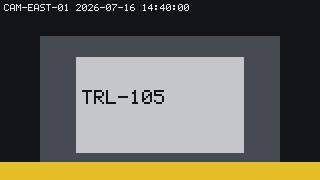
- The recording below holds each test camera’s frames under
frames/<camera_id>/, with their timestamps inframes.jsonl. Open them next toexpected.jsonto see what FACE builds from the frames.
What FACE finds
Against a camera, FACE asks it what it is (RTSP DESCRIBE, or ONVIF) and samples frames, up to max_frames, at fetch time.
| Dataset | Kind | Domain | Primary key | Rows | Fields |
|---|---|---|---|---|---|
frames | video_frame_sequence | dock_vision | none | 73 | 7 |
expected.json in the download has the full model: every field with its logical type, the source’s native type and nullability.
How it joins the Quillmere universe
This source carries 3 of the universe’s shared keys. The same ID means the same thing in every source: a shipment here is the same shipment in the database, the event bus, the GPS track and the claim PDF.
| Universe entity | Fields here | Also in |
|---|---|---|
| device | frames.camera_id | bigquery, databricks, files, gps, iot, kafka, mqtt, postgres, rfid, servicenow |
| dock | frames.dock_id | excel, files, kafka, logisticsapi, postgres, sensorgateway, whs, yms |
| trailer | frames.trailer_id | databricks, document, excel, iot, kafka, mqtt, postgres, servicenow, tms, yms |
Evidence it holds for the planted anomalies:
- ANOM-6, An RFID read with no matching ASN.
streams/cctv/frames.jsonl, look for"camera_id":"CAM-EAST-03"(frame at the read time, no trailer_id).
See all connectors at once for the walkthrough across every source.
Download
Streams are dialled and held open, so their datasets are replay recordings under streams/cctv/, not a zip. Download the files, and use them as described above.
streams/cctv/expected.jsonstreams/cctv/frames.jsonlstreams/cctv/manifest.json- 73 JPEG frames under
streams/cctv/frames/<camera_id>/NNNN.jpg, one per line offrames.jsonl. For example,streams/cctv/frames/CAM-EAST-01/0000.jpg.
The whole universe is universe.json. manifest.json lists every download with its size and SHA-256, and SHA256SUMS is the same list for sha256sum -c.